Showing posts with label iPad. Show all posts

Wednesday, July 18, 2018

Apple iOS 12 Public Beta 3 For iPhone And iPad, Now Available


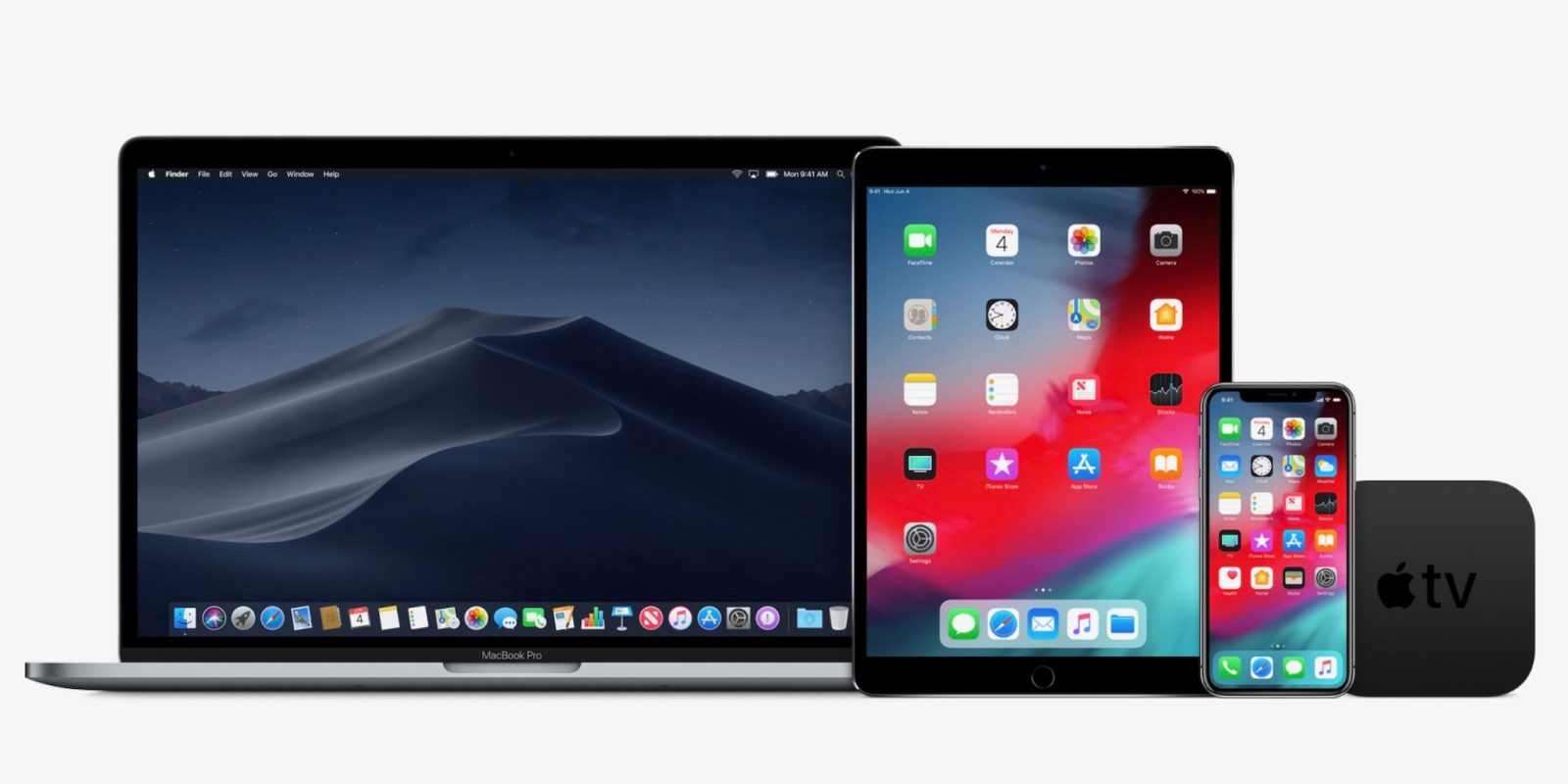
Apple has released the third iOS 12 public beta for iPhone and iPad. The new version follows iOS 12 developer beta 4 which was also just released. The new version includes Activity app stickers in Messages, Memoji customization, and much more. In addition macOS Mojave public beta 3 and tvOS 12 public beta 3 is also available today.

The latest beta version includes cellular data for apps organized by usage, interface tweaks in Wallet, and Photos.

Apple’s public beta program allows users who are not registered developers to test pre release versions of iOS, tvOS, and macOS with new features for free. Enroll in the iOS 12,
macOS Mojave, tvOS 12 public beta by follow the source links below.


Tuesday, July 3, 2018

iOS 12 Developer Beta 3, Now Available


Image result for apple ios 12 beta
iOS Developer Beta 12 includes several significant changes for iPhone and iPad including performance improvements, especially on older devices 


ARKit 2.0 with shared experiences, refined search and sharing in Photos, more Siri access in third party apps and Siri Shortcuts based on Workflow, updates to Stocks, Voice Memos, Apple Books, and Apple News, management features including updates to Do Not Disturb, more manageable notifications, and Screen Time parental controls, Memoji in Messages, and FaceTime up to 32 users.

Other notable changes in iOS Developer Beta 3 includes:

  • Clear All Notifications now has a springy animation
  • Can now swipe to clear alerts in one swipe (like iOS 11)
  • Apple Watch Face Gallery now only highlights new Siri watch face updates (previously showed watchOS 4 faces)
  • Voice Memos for iPad redesigned
  • FaceTime effect picker tweaked
  • CarPlay appears to be fixed when using side and backup cameras
  • Watch app now shows third party apps that work with Siri watch face
  • 11 Activity app stickers that animate and do not require Special Challenge to unlock

To download Apple's iOS 12 public beta hit the source link here.

Wednesday, March 14, 2018

Introducing The Google Assistant On iPad

Assistant iPad.png

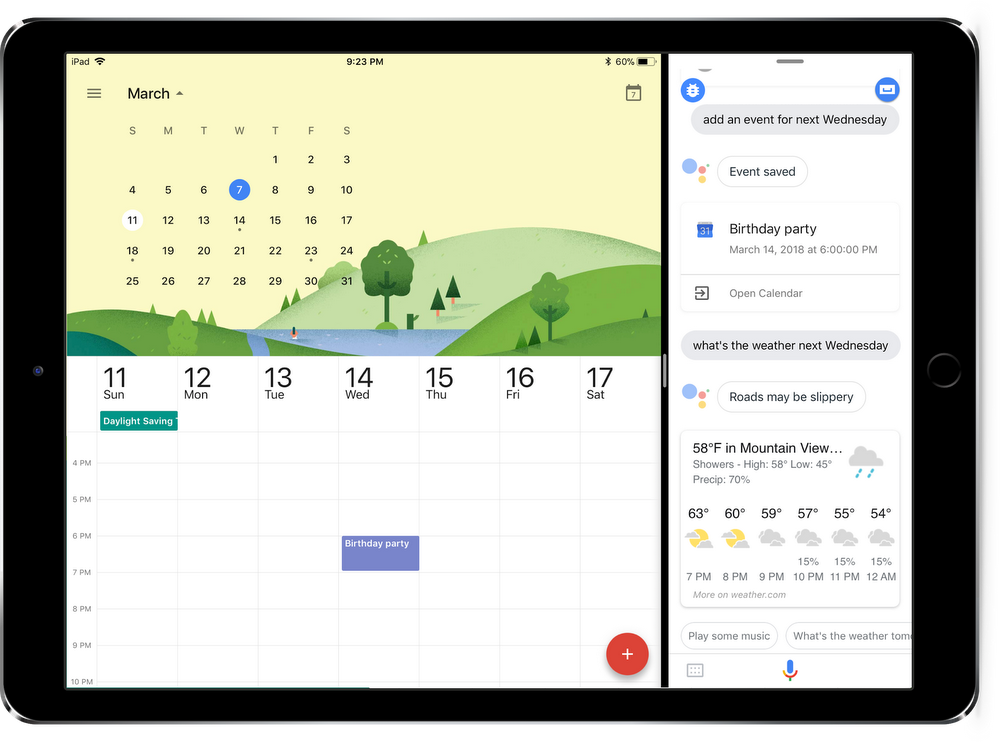
Google announced today the availability of Google Assistant for iPads.

Apple says with iOS 11 iPad owners can multitask pretty well with an Assistant panel open alongside other apps. outside of that, Google Assistant the same Assistant you know and love capable of controlling your smart home, checking weather, calendar events, and everything else.

Need a few examples of things you can do with Google Assistant on your iPad?

Set the mood by having the Assistant “dim the lights”
Cast to your TV by asking the Assistant to “watch the latest news on the living room TV”
Stay in touch by asking the Assistant to “video call mom” or “text Lauren”
Keep up with your chores by asking the Assistant to “remind me to take out the recycling at 8 PM”


Source: Google

Wednesday, February 10, 2016

Apple Releases iOS 9.3 Public Beta 3


Apple has released the third iOS 9.3 public beta to non developer testers today. iOS 9.3 public beta 3 adds new features for iPhones and iPads including Night Shift mode to change the display temperature for evening reading, Touch ID/secure passwords to protect Notes, new 3D Touch shortcuts on the iPhone 6s and 6s Plus, enhancements to the Health and Activity apps, and iCloud for iBooks PDF syncing.


Changes in iOS 9.3 beta 3 included:

  • Verizon Wi-Fi Calling
  • Fixed Control Center icons in landscape
  • Apple News settings in Sweden, possibly other countries (although no app)
  • Tweaked Night Shift explainer in Control Center
  • Tweaked Lock/Unlock toggle in Notes outside of the share sheet

How to register and install iOS 9.3 beta profile...

Source: Apple

Thursday, September 19, 2013

Google Wallet For iOS Now Available For Download


Google today launched an iOS version of its mobile payments app. The official Google Wallet app is now available for download in the App Store, complete with many of the same features included with the recent Android app update.

Once installed, the Google Wallet app for iOS allows users to send money to other people with a valid email address, add loyalty cards and offers to the app and scan credit and debit cards that can then be used to send money and make online purchases. Google Wallet requires iOS 6 or later and is compatible with the iPod touch, iPhone and iPad.


Source: Apple App Store

Wednesday, July 17, 2013

Google Maps Update Available for iPhone, iPad, And iPod Touch

iPhone Screenshot 3   iPhone Screenshot 4

Google has made an updated version of Google Maps available to iOS devices, including the Apple iPhone. The update, which has already been released to Android devices, makes a number of changes to the app. It offers improved navigation features thanks to live traffic updates and real-time re-routing when problems occur on a navigation path. It also adds a new tool called Explore, which can be used to perform searches for nearby places without typing, and builds in reviews for places such as restaurants and other businesses. Last, it populates maps with Google Offers that are nearby. Google Maps 2.0 for iOS is free to download from the iTunes App Store.


Source: iTunes App Store

Tuesday, March 19, 2013

Apple Releases iOS 6.1.3

Apple releases iOS 613 to patch lock screen security hole

A month to the day after Apple issued iOS 6.1.2 in order to patch an Exchange bug, the company has pushed out iOS 6.1.3 today to seal up a security hole that allowed a complex combination of finagling to bypass one's lock screen. 

Moreover, it's said to add Maps updates for the nation of Japan, while also adding a variety of undisclosed "security patches." It looks as if all modern iOS devices (iPad and iPod touch included) are eligible, so feel free to hit up the Settings menu on your device or plug it into iTunes. 

If you aren't seeing it right away (as is the case with this particular editor's iPhone 4S), just keep trying.


Source: Apple

Tuesday, March 12, 2013

Google Now For iOS Demoed In Leaked Promotional Video

Alleged Google Now for iOS video leaks on YouTube, is promptly pulled
iOS fans jealous of Jelly Bean's creepy Google Now might finally have something to get excited about. An October update to the Google Search app finally delivered an updated voice recognition experience to Apple's platform, but sadly alerts and contextual cards of data were nowhere to be seen. Of course, Mountain View has never been one to keep its wares to a single platform, and many expect that it's only a matter of time before Now makes its proper debut on iOS. Those that like to dip their toes in both ponds might be interested in a video brought to our attention by a tipster earlier today.
The clip from our friends over at Engadget is allegedly a low resolution version of a promotional video for Google Now on iPhone and iPad. The video has since been pulled from YouTube and appears to feature the same voice actress as the original Now announcement. Supposedly, Now will be accessible in an upcoming iOS app update simply by swiping up from the main screen. Of course, there's always the chance that is an impressive fake or even a canceled project that's only being leaked now.


Tuesday, February 5, 2013

iOS 6.1 Untethered Jailbreak Now Available

The iOS 6/6.1 jailbreak was just released by the Evad3rs team. We already knew it was coming, yesterday morning for the iPhone, iPad and iPod touch this program was released. It looks like they met that promise, because you can now download the untethered jailbreak tool. It’s called “evasi0n,” specifically, and can be applied through Linux, OS X or a Windows-based machine (XP or higher).


Source: evasi0n

Sunday, January 27, 2013

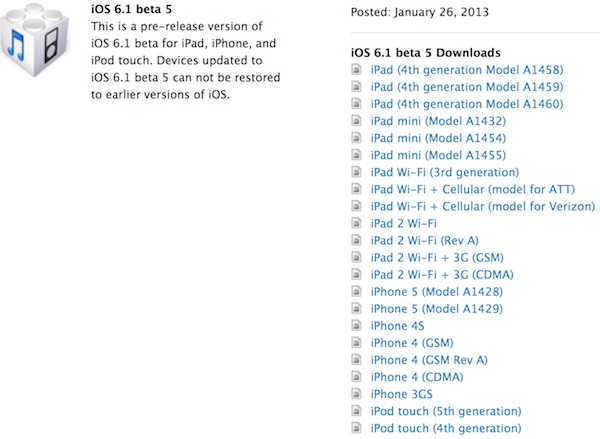
Apple Seeds iOS 6.1 Beta 5 To Developers


Apple today pushed out the fifth beta of iOS 6.1 to developers. The release comes just two days before the fourth beta, which was seeded on December 17, is scheduled to expire.

No public release time frame for iOS 6.1 is known yet, but registered developers can download the latest beta via Apple's Developer page.


Apple Developer page link


Source: Apple Developer page

Could We See A 128GB iOS Device Soon

Could we see a 128GB iOS device soon?  New iOS 6.1 Beta code indicates�maybe?

iOS 6.1 Beta 5 was released to developers yesterday and there is a reference to 128GB capacity devices in the SystemPartitionPadding key in the release manifest. This reference has apparently been absent from previous releases, so perhaps it is an indicator of things to come.

However, this is not conclusive in any way, shape or form. There have been hints in the past, and as we mentioned, we have not seen any devices or specs even approaching the subject. Having written that, seeing a 128GB iOS device seems highly unlikely to us, at least as far as the iPhone is concerned. 

Given the premium price-point of the iPhone, based on current pricing schemes, a subsidized 128GB iPhone would cost $500 and would list full retail for about $950. We do not expect that market research would return a favorable impression to that prospect.


Source: MacRumors

Thursday, January 24, 2013

Embedded Video Tweeting Service Launches For iOS


Twitter's new video tweeting feature was unveiled courtesy of a tweet from CEO Dick Costolo. With the bird out of the bag, Vine's just made its way to iOS, so those with an iPhone, iPad, or iPod touch looking for the video equivalent to 140 characters can pick it up for free now, courtesy of the App Store.

Apple App Store link


Source: Twitter

Wednesday, January 16, 2013

MediaFire Launches Application For Android And iOS


mediafire
If you’ve ever downloaded a file or document from the internet, there’s a very good chance you might have come across MediaFire. It’s long been a favorite of desktop users and has now made the jump into the mobile space with applications for iOS and starting today, Android.
The initial release of the MediaFire application basically does exactly what it promises and isn’t loaded with features just yet. Luckily, that also helps the layout look very simple. After logging into your MediaFire account, all of your files will instantly pop up, just as you’d expect it to. From there, you have easy access to share, download, rename, move the file into another folder, and pretty much any other editing feature you’d want, right at your fingertips.
Here’s a quick rundown of what you can expect out of the box:
  • Keep all your important files at your fingertips
  • View documents, spreadsheets, presentations, video, and listen to audio
  • Take and upload pictures and videos directly in the MediaFire app
  • Upload Android gallery images
  • Create and manage folders of files
  • Share files on the go via email, SMS, links and through other Android apps
  • Quickly search all your MediaFire files and folders

MediaFire is also offering up 50GB of free cloud storage, so if you’re an avid cloud-sharer, this is an app you don’t want to pass up.
“We are very excited to expand our award-winning online storage and collaboration services to Android users around the world,” said Derek Labian, president and CEO of MediaFire. “2013 will mark a major year for online storage providers, and we plan to bring MediaFire to the forefront of this movement with the launch of several stellar products; stay tuned.”
Version 1 of  MediaFire gets a lot right in terms of features, but we can expect many more to come. Even if you’re already invested in a competing application right now, MediaFire has entered the scene strongly with its mobile debut, and will only get better going forward. MediaFire for Android requires 2.2 and higher, and currently does not support tablets like the Nexus 7.
Hit up the links to grab MediaFire for your iPhone, iPad or Android device!

Wednesday, September 19, 2012

Apple Starts iOS 6 Roll Out To iPhone, iPad, And iPod Touch


Apple released iOS 6 today and the update is now starting to hit the iPhone, iPad, and iPod touch. Be patient as not everyone is seeing the update, and if you are getting the update, it may take time to download and install.
iOS 6 brings a new Maps app, Facebook integration, shared photo streams, Siri improvements and more. You can download the update over the air by going to Settings > General > Software Update. If you have iTunes and a cable, you can also connect your iOS device to your computer and download the update manually.

Thursday, July 12, 2012

Rovio And The Amazing Alex Release


Amazing Alex Launch Analysis
At 12:00 p.m. EST, “Amazing Alex” hit the No.1 iPhone paid app position in America; eight hours is possibly the fastest move to No.1 ever by a non-franchise, non-movie tie-in app. Amazing Alex arrives on iOS and Android more than two and a half years after the “Angry Birds” series launched in December 2009 and proceeded to rack up 1 Billion downloads across smartphones, tablets and computers. The competition in the mobile gaming market is far harsher than it was two years ago, and Rovio is taking a risk with its new game. Angry Birds was fast, kinetic and dumb. Its appeal was universal because it demanded very little from players. Amazing Alex is slow, static and smart. It is based on the famously difficult “The Incredible Machine” brain-twister an MS-DOS smash hit from back in 1992.

Amazing Alex by Rovio Android download link
Amazing Alex by Rovio iTunes download link


Tuesday, June 26, 2012

Apple Reveals Dedicated “Podcasts” Application For iOS


APPLE PODCASTS App

Apple on Tuesday officially unveiled its own dedicated podcast application for iOS devices dubbed “Podcasts.” Earlier this month, developers noticed that the podcast button was missing from iTunes in the iOS 6 beta, which hinted that this app was on the horizon. “Podcasts app is the easiest way to discover, subscribe to and play your favorite podcasts on your iPhone, iPad, and iPod touch,” Apple says on the Podcasts product page. The application supports video and audio podcasts, includes a top stations option, the ability to stream or download full episodes, sync with iTunes and much more. Here’s the complete list of features:

Apple Podcast iOS App Features
• Enjoy all of your audio and video podcasts in a single app
• Explore hundreds of thousands of podcasts including shows in over 40 languages
• Try the innovative new Top Stations feature to find new podcast series in a variety of topics, including arts, business, comedy, music, news, sports, and more.
• Browse by Audio or Video podcasts, or see what’s most popular in Top Charts
• Tap subscribe for your favorites and automatically receive new episodes for free as they become available
• Stream episodes or download to listen while offline
• Skip forward and back using simple playback controls
• Turn on Sleep Timer to automatically stop playing a podcast while listening in bed
• Share your favorite episodes with friends using Twitter, Messages and Mail
• Optionally sync your favorite episodes from iTunes on your Mac or PC
• Sync your episode playback for seamless transition between devices

The free application is available now and requires any iOS device running iOS 5.1 or newer.


The free application is available now and requires any iOS device running iOS 5.1 or newer.


Apple App Store download link

Tuesday, June 12, 2012

Apple Brings Siri To The iPad


Apple announced that as part of iOS 6, Siri will be available on the iPad in addition to the iPhone. It's part of a larger update to Siri, allowing the voice-controlled app to now do everything from launch apps to report the batting average of your favorite baseball players. Apple's Scott Forstall mentioned that Siri was coming to "the new iPad," so it sounds like older iPad owners might need to upgrade to get all the new features.

Thursday, May 24, 2012

Oovoo App Adds 12-way Video Chat To Facebook

Mrkt_press_kit_ipad_vc4_hrz
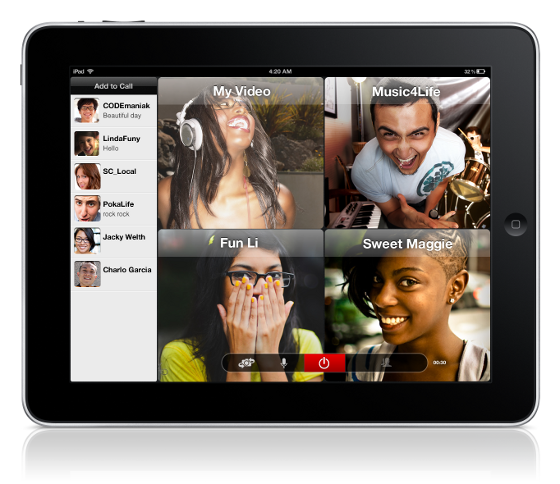
Oovoo video chat service is making a run at Google Hangouts this week, launching a new Facebook application that allows 12-way video chats with users on iOS, Android, and PC clients. The company is also releasing a new iPad app that allows you to host or participate in a 12-way video chat, but you can't view more than four friends at once we're not sure if the iPad's screen size or bandwidth is the problem. Oovoo is also updating the PC, Android, and iPhone clients with a new UI: the PC client gets the biggest changes, but smartphone users will notice some less dramatic interface tweaks. The updates are free and available now, as is the new Facebook app.

Monday, May 21, 2012

iOS Warning Message Hints At FaceTime Over 3G


You can’t currently start a FaceTime video chat from an iPad, iPod touch or iPhone using a 3G network; Apple still requires that users are logged in to a Wi-Fi network, likely to make sure that a minimum level of video quality can be guaranteed. A new warning message inside iOS 5.1.1, discovered by iDevice recently, suggests that 3G FaceTime support will be enabled in the future, however.

If a user first places a FaceTime call over a Wi-Fi network and then switches off the “enable 3G” option within iOS’s Network settings menu, an alert pops up stating that doing so could end the FaceTime call. “Disabling 3G may end FaceTime,” the warning says, specifically. “Are you sure you want to disable 3G?”
A similar message also pops up when a user tries to enable 3G during a Wi-Fi call, AppleInsider discovered. “Enabling 3G will end your phone call. Are you sure you want to enable 3G,” the warning message states.

Oddly, selecting either option never ended AppleInsider’s test FaceTime calls. You just can’t place a call if you’re only on a 3G network. Wireless carriers reportedly asked Apple to disable support for 3G video calls, likely to prevent bandwidth hogging, and only jailbroken phones are capable of executing the feature. It’s possible Apple and wireless carriers will enable the function when a 4G LTE-enabled iPhone is released, or perhaps 3G support will be activated sooner.

Thursday, May 10, 2012

iPad Mini Reportedly Set For October Launch


Apple is indeed preparing a smaller version of its wildly popular iPad tablet and it will launch this coming October for between $200 and $250, a new report claims. Numerous earlier reports have suggested that an iPad with a 7.85-inch display will launch in the third or fourth quarter this year, and now Apple watcher iMore has reinforced these rumors. The site, which has reported accurate information about unannounced Apple products in the past, says the scaled down tablet will look exactly like the current 9.7-inch iPad but smaller. It will also feature a display resolution of 2,048 x 1,536 pixels, identical to the panel on Apple’s new iPad. If iMore’s report is accurate, the move will likely be a crushing blow to vendors like Samsung and HTC, which continue to struggle in the tablet market. A $200 or $250 “iPad mini,” as it has been called, would also likely pose a huge problem for both Amazon and Barnes & Noble, each of which offers a low-cost tablet in addition to their eReader products.