Showing posts with label Mac. Show all posts

Wednesday, March 2, 2016

Jide Released Remix OS Beta For PC


Remix OS

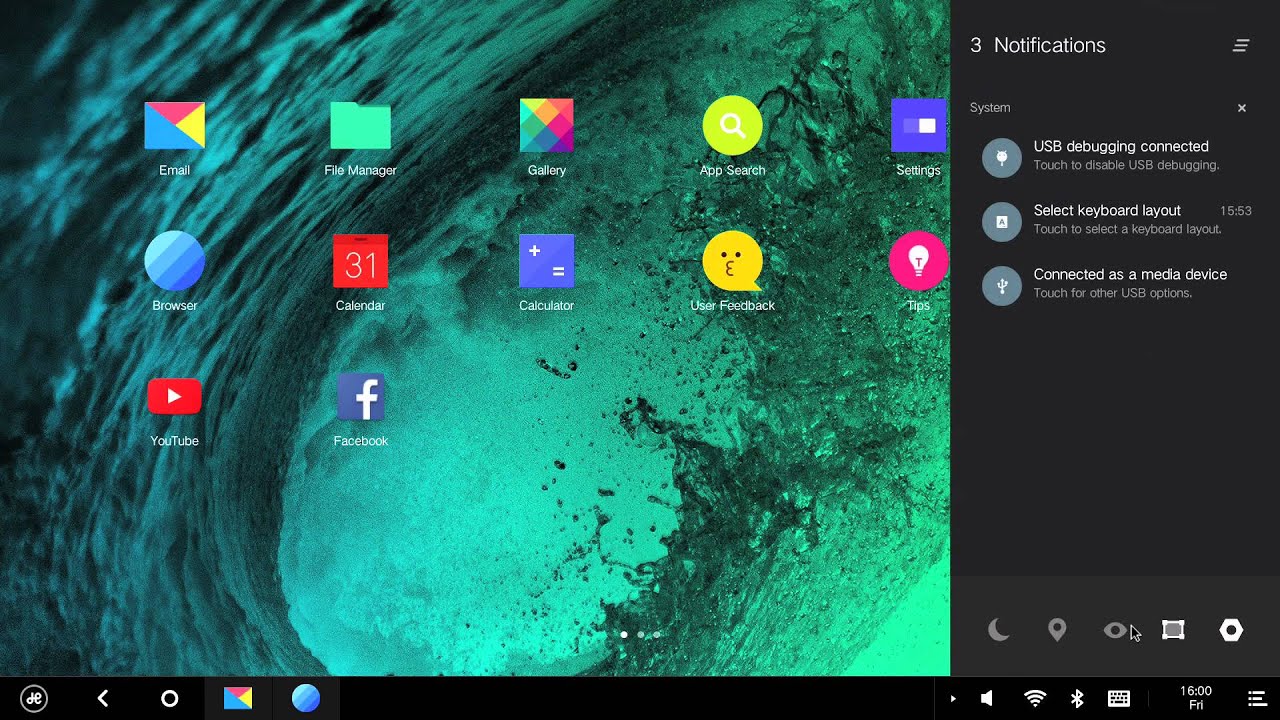
Jide has released Remix OS beta, that will allow you to dual boot with most OSes and then be presented with your computer as a complete Android device. Remix OS beta is a complete Android operating system that runs on PC (and Mac) hardware.
The beta is now available for download from the source link below.

Source: jide.com

How to install... Click the link


Wednesday, January 20, 2016

How To Run Android On A Mac, Remix OS 2.0


Jide.com released an early alpha version of its new Remix OS, it’s a multi window desktop operating system built on Android.

Install how to guide
  • Click "DiskImage"
  • Click the "dropdown menu" and select "ISO"
  • Click on the “” button.
  • Find “RemixISO.img” on your desktop and select it.

You need to ensure you have a fast USB 3.0 flash drive with at least 8GB capacity, and a speed of at least 20MB/s. You’ll also need to make sure you’re using an Intel based Mac.

Once you have your USB stick, and you’ve downloaded the operating system from Jide.com, you need to move the ISO file to your desktop and rename it RemixISO.iso

Once you’ve done that, launch Terminal and type the following exactly as you see it, spaces and all:

hdiutil convert -format UDRW -o Desktop/RemixISO.img Desktop/RemixISO.iso

This turns the Windows friendly ISO file in to a Mac friendly IMG file. You’ll notice you now have RemixISO.img.dmg on your desktop delete the ‘.dmg‘ part of the new file.

The next thing you might want/need to do is format your USB flash drive. You may not need to, but I found it solved some boot error issues I experienced early on. Open Disk Utility on Mac while you have the USB drive plugged in, select the drive, hit ‘erase’ and choose MS-DOS (Fat) from the list of format options.

After that, I was ready to load the software on to the USB stick. I downloaded a program called UNetbootin from GitHub and used it with the following steps:

You might find the program changes your initial selection from ISO to Floppy, in which case, you need to change it back to ISO

Once you’ve hit ‘OK’, it’ll run through its process, which takes a few minutes, and you should have Remix OS 2.0 ready to use on your USB stick.
It will more than likely give you a warning that it won’t work on Mac, ignore it.

When starting up your Mac, press and hold the option/alt key just as it starts booting up when you hear the Mac startup sound, then select the ‘Windows’ option from the two drives on screen.

The first time you do it, it’ll take a few minutes to install, then you’ll get to the set-up window. Now you can boot it up in guest mode or resident mode. In resident mode, it saves all your apps, history and information on the USB stick. So you can take it with you wherever you go, plug it in to any Mac, and never lose anything.

All the apps are placed in the pop-up menu which shows up when you click in the bottom left corner. The bottom bar shows all running apps. Because there’s no Google Play Services or Play Store installed, you need to install apps by downloading APK files directly. I grabbed a bunch of my most-used apps from APK Mirror.com. I discovered afterwards, there is a method for getting Google Play Services and the Play Store on to Remix OS manually.


Source: jide.com

Tuesday, August 4, 2015

OS X El Capitan Public Beta 4 Now Available

Apple has released a new version of the OS X El Capitan Public Beta. Members of the Apple Beta Software Program can download the new OS X El Capitan release through the Updates section on the Mac App Store.
If you're interested in participating, you'll have to sign up at the Apple Beta Software Program website to get started.
If you're interested in the OS X El Capitan public beta, hit up the link below for more details on how to sign up for Apple Beta Software Program.

Monday, February 3, 2014

Google Now Available For Desktop Chrome Beta

Google’s Chrome team today announced the availability of Google Now for Chrome Beta users for desktops. Google Now is a helpful app that brings important information you care about right to your attention without you having to ask for it. 
To take full advantage of Google Now simply make sure you are using the Chrome Beta app for Windows, Mac, or Chromebook. This feature is now auto enabled, just click on the bell icon on your desktop or numbered box on a Chromebook there you will see all of your Google Now cards.
You can download the Chrome Beta app for desktops here.

Sunday, January 27, 2013

Could We See A 128GB iOS Device Soon

Could we see a 128GB iOS device soon?  New iOS 6.1 Beta code indicates�maybe?

iOS 6.1 Beta 5 was released to developers yesterday and there is a reference to 128GB capacity devices in the SystemPartitionPadding key in the release manifest. This reference has apparently been absent from previous releases, so perhaps it is an indicator of things to come.

However, this is not conclusive in any way, shape or form. There have been hints in the past, and as we mentioned, we have not seen any devices or specs even approaching the subject. Having written that, seeing a 128GB iOS device seems highly unlikely to us, at least as far as the iPhone is concerned. 

Given the premium price-point of the iPhone, based on current pricing schemes, a subsidized 128GB iPhone would cost $500 and would list full retail for about $950. We do not expect that market research would return a favorable impression to that prospect.


Source: MacRumors

Saturday, June 23, 2012

Samsung Brings iTunes And iOS Data To Galaxy Devices


Samsung has announced that it's partnered with developer Mushroom Media to bring the company's Easy Phone Sync application to owners of Galaxy smartphones and tablets. As the name suggests, Easy Phone Sync is allows phones to transfer content from their PCs over a USB connection, with the particular focus being on importing music and other media from iTunes, and contacts and messages from iOS. The app, which will presumably be available for a fee at some point in the future, can be downloaded for free on Google Play if you've got a Galaxy device.
The app release and partnership with Mushroom Media is likely part of Samsung's plans to give iOS users an easy path from Apple's ecosystem to its own. Samsung has made no secret of its efforts to establish itself as a equal competitor to Apple, and the Korean manufacturer will be hoping to lure upgrading iPhone users to its Galaxy S III with apps like this. While Easy Phone Sync isn't anywhere near as polished as an Apple app, it's fast and functional enough to be of use to iOS converts making the switch to a Galaxy phone.
We've given Easy Phone Sync a quick test on the Galaxy S III, and it seems to work well enough. Inexplicably though, the phone app seems to run persistently in the background, leaving an unsightly notification in place at all times.  The phone all only serves to install a license key though, and after that it can be uninstalled. Regardless, persistent notifications are annoying, and make for a sub-par user experience -- on an officially-sanctioned app like this, there's no excuse.

Google Play Easy Phone Sync download link
PC/Mac Easy Phone Sync download link
*Easy Phone Sync is available to download now for both PCs and Macs in conjunction with an app for Samsung Android devices.

Tuesday, April 24, 2012

Google Drive And Android App Go Live


Google Drive is no longer a secret, as the Google Drive Android app is now live in the Play Store and the description gives us a great idea of what to expect.
As expected, Google Drive will be a Dropbox and Box competitor, as you’ll get some free cloud storage space to store your files. The official announcement went live a few seconds ago and it offers 5 GB of storage for free. You can also buy additional storage for a fee and this includes 100 GB for $4.99 a month, dramatically cheaper than the competition.
The app’s description also gives us some solid details. This is an evolution of Google Docs, so you can collaborate on the files in your Google Drive account. You can also open up multiple file types (including video) in a browser. Naturally, you’ll also have strong search capabilities including the ability to search through scanned documents with OCR technology.

Keep everything. Share anything.

*** Google Docs is now a part of Google Drive! ***
* Keep everything. Share anything.
* With Google Drive, you can store all your files in one place, so you can access them from anywhere and share them with others
* Use the Google Drive Android app to access your photos, documents, videos and other files stored on your Google Drive
* Upload files to Google Drive directly from your Android device
* Share any file with your contacts
Access files others have shared with you on Google Drive
* Make any file available offline so you can access them even when you don’t have an Internet connection
* Create and edit Google documents with rich text formatting
* Edits to your Google documents appear to collaborators in seconds
* Make quick changes to spreadsheets
* View your PDFs, presentations and more
* Upload and convert files to the Google Docs format
Take a photo of printed text and convert it to a Google document
* Optimized experience to take advantage of larger screens for tablet users, Honeycomb (Android 3.0+)


The Google Drive service is live at drive.google.com and you can download the Android app here. Google also says that an iPhone and iPad version are coming soon.

Monday, January 16, 2012

BlackBerry PlayBook Root Tool DingleBerry 3.0 Released


dingleberry2

The BlackBerry PlayBook root is getting an update. DingleBerry 3.0 has been released with support for downgrader and to open up Hulu in both the Windows and Mac release.

If you have yet to root your BlackBerry PlayBook, you can view a how-to video on rooting and adding the Android Marketplace here.