Showing posts with label PC. Show all posts

Wednesday, January 21, 2015

Microsoft Reveals Windows 10 Details


Microsoft today offered an early first look at its forthcoming Windows 10 operating system, which will run on PCs, tablets, and phones. Microsoft said it is taking a new, more user-centric approach with Windows 10. It is incorporating the feedback it received about Windows 8/8.1 and is making sure to add user requested features, such as the old Start menu. The company now views Windows more as a service and it will provide continual updates. 

Microsoft said Windows 10 will be a free upgrade during its first year of availability, for example, to all devices running Windows 7, Windows 8.1, and Windows Phone 8.1. Windows 10 for PCs and tablets will gain features from Windows Phone, including the Action Center and Cortana, Microsoft's voice activated personal assistant. Windows devices with screens 8 inches and larger will include the "desktop experience." Smaller devices will have an altered experience more suited for phones. A rough build of the phone centric version of Windows 10 features a revised settings menu that has new graphics. 

Windows 10 also allows users to move the keyboard around on the screen if they so wish. The entire Windows 10 platform will include Skype more firmly entrenched across apps. Furthermore, full versions of Word, Excel, and PowerPoint that closely match the desktop variants will be included in Windows Phone 10. 

All Windows 10 devices will have a new Outlook client, which has been revised with the Word engine. Other major app rewrites include the calendar, photo gallery, and Internet Explorer, which is based on Project Spartan, a complete overhaul of the browser. Lastly, the entire platform will more broadly support Xbox gaming, including PC to Xbox play. Microsoft said the first preview of Windows 10 for phones will be available to "insiders" beginning in February.

Source: Microsoft News

Monday, May 13, 2013

Check Out Samsung SideSync For Phone And PC


samsung-sidesync-630

If you own a Samsung PC and Samsung smartphone, then you might want to check out SideSync, a new application that connects the two devices and lets you perform some pretty convenient functions. A new YouTube video shows off some of the tricks that SideSync can perform including using your keyboard and mouse on your phone, copy and pasting between the two devices, and drag and dropping files from one device to another.
The app is only available from the Samsung App store, so owners of other devices will not be able to try it out. I happen to have a Samsung laptop and a Galaxy S 4, so I’ll be testing it out later and reporting back on the experience. Check out the demo video below and let us know if you get it up and running on your Samsung device.


Source: Samsung Apps

Saturday, June 23, 2012

Samsung Brings iTunes And iOS Data To Galaxy Devices


Samsung has announced that it's partnered with developer Mushroom Media to bring the company's Easy Phone Sync application to owners of Galaxy smartphones and tablets. As the name suggests, Easy Phone Sync is allows phones to transfer content from their PCs over a USB connection, with the particular focus being on importing music and other media from iTunes, and contacts and messages from iOS. The app, which will presumably be available for a fee at some point in the future, can be downloaded for free on Google Play if you've got a Galaxy device.
The app release and partnership with Mushroom Media is likely part of Samsung's plans to give iOS users an easy path from Apple's ecosystem to its own. Samsung has made no secret of its efforts to establish itself as a equal competitor to Apple, and the Korean manufacturer will be hoping to lure upgrading iPhone users to its Galaxy S III with apps like this. While Easy Phone Sync isn't anywhere near as polished as an Apple app, it's fast and functional enough to be of use to iOS converts making the switch to a Galaxy phone.
We've given Easy Phone Sync a quick test on the Galaxy S III, and it seems to work well enough. Inexplicably though, the phone app seems to run persistently in the background, leaving an unsightly notification in place at all times.  The phone all only serves to install a license key though, and after that it can be uninstalled. Regardless, persistent notifications are annoying, and make for a sub-par user experience -- on an officially-sanctioned app like this, there's no excuse.

Google Play Easy Phone Sync download link
PC/Mac Easy Phone Sync download link
*Easy Phone Sync is available to download now for both PCs and Macs in conjunction with an app for Samsung Android devices.

Thursday, May 24, 2012

Oovoo App Adds 12-way Video Chat To Facebook

Mrkt_press_kit_ipad_vc4_hrz
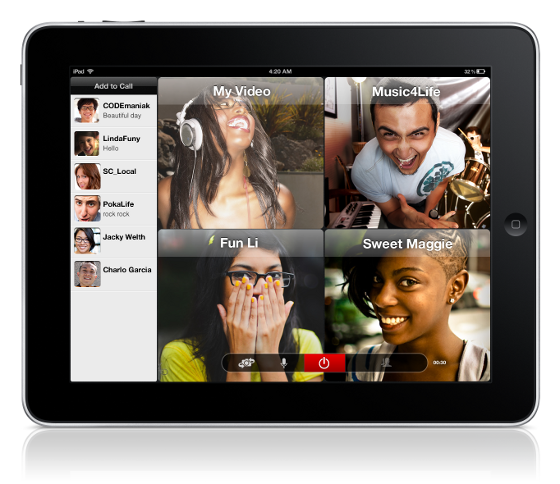
Oovoo video chat service is making a run at Google Hangouts this week, launching a new Facebook application that allows 12-way video chats with users on iOS, Android, and PC clients. The company is also releasing a new iPad app that allows you to host or participate in a 12-way video chat, but you can't view more than four friends at once we're not sure if the iPad's screen size or bandwidth is the problem. Oovoo is also updating the PC, Android, and iPhone clients with a new UI: the PC client gets the biggest changes, but smartphone users will notice some less dramatic interface tweaks. The updates are free and available now, as is the new Facebook app.

Tuesday, April 24, 2012

Google Drive And Android App Go Live


Google Drive is no longer a secret, as the Google Drive Android app is now live in the Play Store and the description gives us a great idea of what to expect.
As expected, Google Drive will be a Dropbox and Box competitor, as you’ll get some free cloud storage space to store your files. The official announcement went live a few seconds ago and it offers 5 GB of storage for free. You can also buy additional storage for a fee and this includes 100 GB for $4.99 a month, dramatically cheaper than the competition.
The app’s description also gives us some solid details. This is an evolution of Google Docs, so you can collaborate on the files in your Google Drive account. You can also open up multiple file types (including video) in a browser. Naturally, you’ll also have strong search capabilities including the ability to search through scanned documents with OCR technology.

Keep everything. Share anything.

*** Google Docs is now a part of Google Drive! ***
* Keep everything. Share anything.
* With Google Drive, you can store all your files in one place, so you can access them from anywhere and share them with others
* Use the Google Drive Android app to access your photos, documents, videos and other files stored on your Google Drive
* Upload files to Google Drive directly from your Android device
* Share any file with your contacts
Access files others have shared with you on Google Drive
* Make any file available offline so you can access them even when you don’t have an Internet connection
* Create and edit Google documents with rich text formatting
* Edits to your Google documents appear to collaborators in seconds
* Make quick changes to spreadsheets
* View your PDFs, presentations and more
* Upload and convert files to the Google Docs format
Take a photo of printed text and convert it to a Google document
* Optimized experience to take advantage of larger screens for tablet users, Honeycomb (Android 3.0+)


The Google Drive service is live at drive.google.com and you can download the Android app here. Google also says that an iPhone and iPad version are coming soon.

Saturday, November 19, 2011

Install Android 3.2 Honeycomb With Android Market on Your Laptop


There’s a little open source project going on called Android-x86 that aims to get Android up and running on your laptop or desktop PC. The results so far? Almost fully functional builds of Android 3.2 Honeycomb booting on a various netbooks and laptops.
The process involves downloading the Android ISO then using UNetbootin to install the image to a USB stick or SD card. After that, you’ll have Honeycomb up and running on your PC. Most of the PC hardware like WiFi is working just fine and they’ve even managed to get the Android Market installed. Must of the luck users have been experiencing is with ASUS branded PC’s but there have been reports of others working with a few glitches.
I would imagine Ice Cream Sandwich development will pick up steam now that the source for Android 4.0 has been released. If you want to give Honeycomb a spin on your PC, hit up the source link for downloads and further instructions. I’ve included the video below of one user who got Android 3.2 booted up on his Eee PC netbook. Cool stuff.
 
Download: Android-x86.org