Saturday, November 19, 2011

Google Confirms no Adobe Flash for Ice Cream Sandwich, for the time being


If you lucky owners of the Galaxy Nexus in these first days of its release complete with the first iteration of Ice Cream Sandwich, you’ll notice that you do not have Adobe Flash Player installed, nor do you have access to a download on the Android Market – Google has just confirmed with us that this is normal and that Flash support will only come once Adobe makes the call to update the mobile version for Android 4.0. You currently will not have the ability to load either a new version or one of the older versions of Flash Player for Ice Cream Sandwich until Adobe makes the call to update their app to be compatible with this newest version of Android. Don’t get too frazzled quite yet though, that’s not the whole story.
Those of you about to have a heart attack over this would do well to note that it was inevitable as Adobe announced that they’d be axing the mobile version of Flash in favor of HTML5 earlier this month. Then if you’ll go ahead and read what Google has let us know, you’ll see that the story isn’t necessarily completely over for Adobe’s mobile version of Flash. Even though the app and support for Flash will be ending relatively soon, Google had the following to say:
“Flash hasn’t been released for ICS yet so as far as we know, Adobe will support Flash for ICS.” – Google
Have a peek at the gallery below to see several signs that Adobe Flash Player isn’t active in Ice Cream Sandwich, and note that these screenshots are taken on the non-Verizon version of the Galaxy Nexus. You can see the rest of our Galaxy Nexus coverage by heading to our giant and ever-expending Galaxy Nexus Portal while the same situation is true for Android 4.0 in our Ice Cream Sandwich portal.

Install Android 3.2 Honeycomb With Android Market on Your Laptop


There’s a little open source project going on called Android-x86 that aims to get Android up and running on your laptop or desktop PC. The results so far? Almost fully functional builds of Android 3.2 Honeycomb booting on a various netbooks and laptops.
The process involves downloading the Android ISO then using UNetbootin to install the image to a USB stick or SD card. After that, you’ll have Honeycomb up and running on your PC. Most of the PC hardware like WiFi is working just fine and they’ve even managed to get the Android Market installed. Must of the luck users have been experiencing is with ASUS branded PC’s but there have been reports of others working with a few glitches.
I would imagine Ice Cream Sandwich development will pick up steam now that the source for Android 4.0 has been released. If you want to give Honeycomb a spin on your PC, hit up the source link for downloads and further instructions. I’ve included the video below of one user who got Android 3.2 booted up on his Eee PC netbook. Cool stuff.
 
Download: Android-x86.org

BlackBerry OS 7.1 Device Simulators Now Available for Download


11x0502n823dvafsd
developers, RIM has released BlackBerry OS 7.1 simulators and they are now available for download from the BlackBerry website. For anyone looking to make OS 7.1 apps or simply try out OS 7.1, then you’ve got OS 7.1 simulator for the 9900 and 9860 waiting for you to download them!

Thursday, November 17, 2011

How to Force update Android Market for music downloads


I have a Samsung Nexus S 4G, HTC EVO, LG Marquee and Samsung Galaxy Tab 7". 


If you go to menu>settings>applications>manage applications>all>search Market and click on the Market>choose "clear data">go to the home screen and re-open the Android Market you will now see the option for downloading music.


Happy listening!!! 

Motorola Mobility stockholders approve Google merger


Google-Motorola
Not that we ever really expected otherwise, but the shareholders of Motorola Mobility today approved the company's merger with Google. Motorola says 99 percent of the votes were in favor of the merger, and the votes represented about 74 percent of the company's outstanding shares as of Oct. 11.
“We are pleased and gratified by the strong support we have received from our stockholders, with more than 99 percent of the voting shares voting in support of the transaction," CEO Sanjay Jha said in a released statement. "We look forward to working with Google to realize the significant value this combination will bring to our stockholders and all the new opportunities it will provide our dedicated employees, customers, and partners.”
Google has said it intends to continue to run Motorola as a separate company. The deal, worth some $12.5 billion, is expected to close late this year or in early 2012.

Did Ice Cream Sandwich for tablet appears in leaked press image


While the Galaxy Nexus and its international release complete with Android 4.0 Ice Cream Sandwich aboard are easily the biggest news surrounding the release of Google’s newest mobile OS, it would seem that Google is already ramping up its efforts to show off the tablet-based capabilities of the system. What you’re seeing here is an official Google-made render of two devices, one looking rather similar to the Galaxy Nexus, the other looking much closer to a Galaxy Tab, though both have slight smoothings out of detail that make them instead simply rather well made renders. Google is likely to release this image imminently on one of their home pages.
Meanwhile you can take comfort in knowing that Ice Cream Sandwich wont look all that different from what Honeycomb looked like on the tablet, complete with the three buttons in the lower left (updated to reflect the change in icons now) as well as the slightly more cyan-colored accents. Icons sit on the first homepage as they would otherwise, and the time in the lower right-hand corner is updated to the new font made specifically for this system alongside a wi-fi signal and a full battery. You’ll find an apps button in the upper right, and a simple Google search widget in the upper left.

Motorola Hit with Lawsuit Over Alleged Stolen Trade Secrets

Motorola has been sued by a software developer firm named Lemko over allegations that it misappropriated trade secrets that were stolen from Lemko. Lemko alleges that Motorola hired an ex-Lemko employee, who gave Motorola code related to how base stations and cell phones determine one-another's exact location. Lemko also alleges that Motorola shipped this code to its operations in China. Further, Lemko alleges that Motorola admitted the code theft and then destroyed all evidence of the theft and the admission. "Lemko is committed to protecting itself against the theft of its software. Lemko will vigorously defend its intellectual property rights and will exercise its legal rights to prevent Motorola's illegal sale which would result in the fraudulent conveyance of our source code to Google," said the company in a statement. The lawsuit was filed in Cook County Circuit Court, and applies to Motorola Mobility, and the former Motorola, Inc.

Skyvi is a better alternative to Siri than Iris


Ss-480-0-1[1]Skyvi is an Android-based Siri alternative that seems to make up several of the answers, but otherwise functions in a similar way. Unfortunately, getting useful information from Iris has been next to impossible for me. Skyvi, on the other hand, is leaps and bounds further along the developmental road at the moment, with Twitter and Facebook integration and an ability to answer most questions I threw at it.
Here are my last few Skyvi questions/requests and answers:
  • How far is Mars? 1.441AU
  • Where is the best Chinese food in Nashville? (it gave me several addresses)
  • Tweet that I love my wife. Twitter shows "that I love my wife"
  • What is the capital of Kansas? Topeka
  • Where am I right now? Nashville, Tennessee
  • How long is Route 66? 60 minutes (it gave the TV show's length)
I've had some issues with a few questions, such as asking for a decent lasagna recipe, and there seems to be a lack of maps or navigation ability, but as a work-in-progress I'd say this is at about two-thirds of what it needs to be to compete with Siri in a very, very short development time.

Img[1]When it doesn't know the answer it tends to get a bit sassy with you, which I believe the developers call "personality." It can't set an alarm on the phone or speak to you either; however, I actually consider that an improvement over Siri and Iris's voices.
The Facebook integration is pretty neat. You can say "read my Facebook" and see a live stream; you're then able to comment on people's posts by speaking. Unfortunately, the speech recognizer sometimes flubs what you want and there's no "delete comment" evident. But you can say something like "read Bob Bob's Facebook" and it will pull up posts only by him, which is quite useful.
All in all it's a fairly nifty little app so far, and until Siri is released in one form or another on Android, if you've got to have it, then I think Skyvi is probably your best free bet.

Download link: Market (web)

HTC HD7 Windows Phone Software Update Brings Internet Sharing


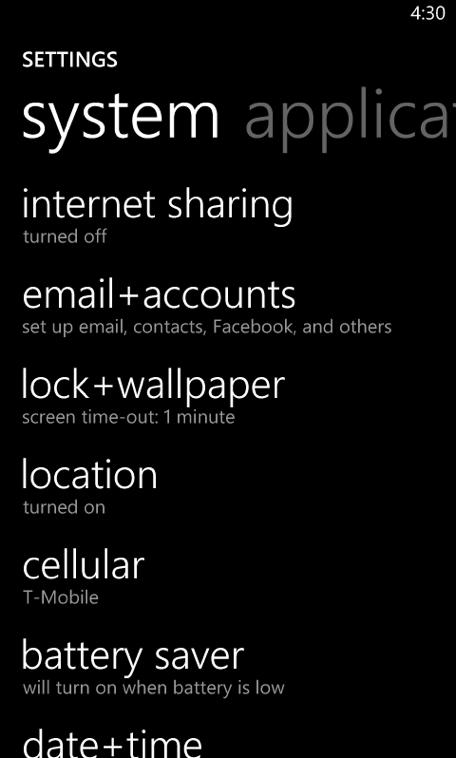
T-Mobile HTC HD7 Windows Phone 7 owners take not as a recent update has turned on the internet sharing feature allowing your phone to become a mobile hotspot. We believe the update began as early as yesterday and like most rollouts, could be staggered for the next few days. The introduction of internet sharing has not brought word from the Magenta mothership as to what if any changes must be made to a data plan in order to take full advantage of this new feature.

BBM v6.1 Beta Now Available


bbm6-os7
Today BBM v6.1 is now available in beta from BlackBerry Beta Zone for BlackBerry smartphone users. This version of BBM is giving users more ways to personalize with new emoticons and animated avatars, making BBM even more fun!
Key features include:
·         Animated avatars* – Now you can access a selection of animated GIFs that come alive when you hover over the avatar. Three animated avatars are available as part of the beta as a sneak peak (including a ‘smile’, ‘laughter’ and ‘in love’) – with a greater selection to come at launch. You can access avatars when changing your display picture within the Avatars folder and can source your own animated GIFs
·         12 new emoticons – Add to the range of expressions available to enhance your conversations with12 new emoticons to choose from.
·         Personal Message size increased to 160 characters – We’ve doubled the size of the personal message space to 160 characters. The previous limit was 80 characters.
·         Colored chat bubbles – Customize the color of chat bubbles with 10 colors to choose from. You can pre-assign these colors to your contacts by simply going into your BBM contacts’ profile and selecting the desired contact chat color from the palette.
·         Camera / Avatar Integration – Now you can update your BBM avatar right from the BlackBerry camera app by selecting “Set as BBM Display Picture” from the menu options.

Download BlackBerry Messenger 6.1 from BlackBerry Beta Zone here.